My Notes on Installing Debian Linux
John Peterson, October 2002
contact102 at saccade.com
Why?
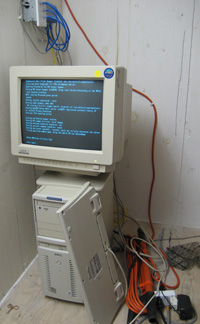 Why futz with Linux box? I use
a Windows machine, my wife uses a Mac, and for a server in the
middle Linux does the best job of talking to both. It's also a
strictly laptop household. I've always like the idea of things
you could do with a machine that's always on, and Unix is optimized
for that. It's also incredibly cheap: The $25 for the set of Debian
CD's was more than what the scavenged server hardware cost.
Why futz with Linux box? I use
a Windows machine, my wife uses a Mac, and for a server in the
middle Linux does the best job of talking to both. It's also a
strictly laptop household. I've always like the idea of things
you could do with a machine that's always on, and Unix is optimized
for that. It's also incredibly cheap: The $25 for the set of Debian
CD's was more than what the scavenged server hardware cost.
Bringing up the hardware
The scavenged system is a Dell XPS D300 PII/300/64mb/4GB. The
CPU was missing, and I had to take a hacksaw to the replacement
CPU's heatsink to get it to fit. Oddly enough, the box appears
totally dead without the CPU installed - the fans don't even spin.
I scavenged an old Mac CPU cooling fan, and held it in place with
rubber bands. It didn't like the AGP video card I found for it
(Rage-128), but an older Imagine 128 seems to work, albeit in
VGA mode only - fine for just running in server mode.
Big Warning: If you ever want to swap out the motherboard,
be aware that Dell uses non
standard pinouts for the power connector! Replacing the
motherboard without replacing the power supply will fry the new
motherboard! I found out on the web before I tried swapping motherboards,
and boy was I grateful.
Bringing up Debian
I bought Debian CD's (3.0
Woody stable) since that distro seems to be the most complete,
and the "purest" free software-wise. But only after
the CD's showed up did I see reviews lamenting the "difficult"
installation. Uh oh. The first CD booted, but couldn't find the
disk drive. Puzzled, I saw a new "easy" installer
on the net by the Progeny project. The good news is it could see
the disk, so it dumped me in the GNU "parted"
program to do partitioning. I did my partitions here, even though
(in retrospect) this was much harder to use than cfdisk.
But then when it came time to install, it started sucking the
entire distro off the 'net. Ugh. Reboot. I don't think I got the
boot partition quite right (just have "swap" and "everything
else") but that seems to work just fine.
After much fiddling around, I tried the fifth Debian CD. This
one found the (now partitioned) disk drive, and seemed happier
in general, so I let it do its thing. Many questions to answer,
many obscure tips, but it seem to work pretty well. Tasksel is
very cool for selecting the desired array of packages. I didn't
bother installing X windows or anything UI releated, as the box
is used strictly as a server.
Once it rebooted, it was apparent that everything was cool
except the networking. A few pokes with ifconfig, and
it was obvious there was no ethernet at all. For some reason the
installer missed the Ethernet card. The cheapo-two-chip Ethernet
card had no brand or identifying marks, but typing the numbers
found on the larger chips into Google eventually linked it to
the "via-rhine" driver. /usr/sbin/modconf was
pretty good about re-installing the driver. Then it was necessary
to go back into /etc/network/interfaces and add the missing
lines to get it to auto-configure TCP. With that, the system was
essentially on the air and functioning.
Networking Stuff
Samba (for talking to Windows filesystems) was more problematic.
I kept getting "security errors" or it would refuse
to let me log in as anything but guest, and no password was accepted.
After reading much documentation (Samba is complex...) and playing
with the config files in /etc/samba, I finally hit on
the cause: the default /etc/samba/smbpasswd is bogus.
Resetting it (via the smbpasswd command) made it happy.
Some more poking around revealed that to talk to Macs, netatalk is needed. This
isn't installed by default, but dselect smoothly pulled
it in. The default config files in /etc/netalkt work
OK, and I was able to log right in.
The final tweak was bringing in ntp - again from dselect
- and letting it run. This fixed the clock.
So Far...
The box has been very stable - up for nearly three months solid.
It lives upstairs (hostname: attic), at least until the
weather gets too warm. I access it strictly via the house network.
I'll add notes below as I find uses for and update it.
Update Jan 2003
I added an 80G IDE drive for /home, to make it a household fileserver.
It's now got enough space we can keep photos and music on it,
as well as system backups.
Update Mar 2003
I've given up on netatalk for the time being, due to a
bug
copying a number of files with resource forks (apps, photos with
thumbnails, etc.). Since Mac OS X 10.2 supports the smb protocol,
it works better just to let the Mac talk to the Samba server.
Overall samba seems much better supported; I suspect netatalk
(and Appletalk in general) is slowly becoming obsolete.
Update July 2003
Attic is now monitoring
the breakin attempts on our local network.
Update 14-Dec-2003
One of the main uses of attic is as a backup
server. The first time I tried to backup my Windows notebook to
file on a Samba partition using Retrospect, it choked. Retrospect
said:
Trouble writing: "AtticBackupA" (824314368),
error -102 (trouble communicating)
Samba said (in /var/log/samba/log.smbd):
2003/12/07 06:12:11, 0] lib/util_sock.c:read_data(436)
read_data: read failure for 46639. Error = Connection reset by
peer
This led me to believe it was some weird protocol error or
bug with Samba. But a little more digging uncovered this gem in
/var/log/kern.log
Dec 7 22:47:17 attic kernel: NETDEV WATCHDOG: eth0: transmit
timed out
Dec 7 22:47:17 attic kernel: eth0: Transmit timed out, status
0000, PHY status 782d, resetting...
Ah, now something to Google for. This turned up that the via-rhine
ethernet driver in my 2.4.18 kernel was out of date and buggy.
Some fishing around indicated the fixes were in 2.4.22 (the latest
available by the Debian people). Setting /etc/apt/sources.list
to a friendly "testing" mirror and doing:
apt-get -s install kernel-image
Gives a list of possible kernels to install (as I painfully discovered,
this is the easiest way to get the name). Then you can do:
apt-get install kernel-image-2.4.22-1-386
To get the kernel. After letting it do its thing, you boot and
/home is missing??? After the initial panic wore
off, I found that for whatever reason, the new kernel didn't bother
to load any of the IDE drivers. A quick spin with modconf
to load most all the ide modules fixed this. Whew.
Update 19-Dec-2003
It's a hardware problem. Even with the kernel upgrade
and the latest driver, I still got transmit timeouts that were
long enough to cause Samba to reset the connection. I contacted
the maintainer of the Via-Rhine Ethernet driver, Roger Luethi,
and he confirmed that particular Ethernet chip has problems. I
swapped the card out with another cheap Ethernet card (this one
based on a RealTek chip) and now 12 Gb backups complete without
a hitch. Roger apparently collects buggy Rhine ethernet cards,
so I've packed up the card and sent it off to Switzerland for
him to inspect.
Update 1-May-2005
Updated link about Dell's non-standard power supply.
Update May-2007
Well, the purchase of two new laptops with larger disks,
and the accumulating pile of digital photos started filling up
Attic's 80G disk. So I bought a new 320GB IDE drive, plugged it
in and...half the space is missing?!
Fishing around with Google reveals that in the years since
Attic was first set up, the disk drive interface standard went
from "ATA-2"
to "ATA-6", which added more bits with something called
"LBA".
In other words, the motherboard's old IDE controller didn't have
access to enough bits to access all the blocks on the fancy new
drive, leaving half of it inaccessible.
Dude...the "late nineties" was a decade ago.
Time for a new disk controller. If only it were so simple.
Attic's Linux 2.4.22 kernel doesn't have a driver for newer controllers,
and the latest kernel available for Debian 3.0 (2.4.27) didn't
either. So a Linux 2.6 kernel was needed, requiring a newer version
of Debian, 4.0.
After some failed experiments with kernel upgrades, I realized
the simplest solution was just to re-install Debian 4.0 from scratch.
Rather than buy DVDs, I downloaded the Debian NetInstall
CD, booted from it, and let it re-format the boot drive and drag
in what it needed over the net. This actually works quite well;
the amount of re-configuring necessary was less than, say, updating
a Windows machine. The exception is the Samba file sharing service,
which needed to have its configuration files re-done for the new
version. Note to self: remember to save the contents of /var/local,
along with /etc when doing Linux upgrades,
and note the CD-ROM moves from /dev/hdc to /dev/hda
when you move the cable and take out the old IDE disk, so be sure
to update /etc/fstab accordingly.
Since I was opening up the case, I topped up the memory supply
(to 320MB) and replaced the rubber bands holding the CPU cooling
fan with plastic wire-ties (the rubber bands had disintegrated).
Since mainstream disks are now based on the SATA
interface, the new SATA disk controller is based on the VIA VT6421
chip (using up my last PCI slot). I returned the 320GB PATA drive,
and (for an extra $40) exchanged it for a 500GB SATA drive.
Now, about that little memory upgrade. Nothing is ever simple
with old computers. When the memory arrived (two 128 DIMMs to
add to the existing 64MB) I popped them in and...only 64MB shows
up (sensing a pattern here?). Back to Google, and it turns out
that the Dell XPS D300 requires a BIOS upgrade to "A09"
in order to see "new" SPD 1.2 complient DIMM memory.
Fortunately, the Dellaphant
never forgets, and the BIOS upgrade was still online. Okayyy,
how do you do install a BIOS upgrade? You'll need...wait for it...a
floppy disk. Remember those?
Fortunately I still had a laptop with a floppy drive that swaps
in place of the CD-ROM. And (even more amazing) I still had a
floppy disk
around, literally rescued from a trash can that was going out
that day. The first attempt failed, the special boot floppy whirred,
clicked, and hung. Then I discovered that before running the utility
to create special BIOS-flasher boot floppies, you must first right-click
format the A: drive and check the "Create an MS-DOS
Startup Disk" box. Then you need to fiddle with the Dell's
BIOS settings to get it to boot from the floppy and do its flashing
magic.
New BIOS in place, about two dozen power-cycles later (the
new BIOS erased all the previous settings and configuration) and
it's back on the air, with everything in place. At this point
I keep reminding myself that a Mac Mini with a 500GB external
drive would run $800 and not be nearly so...uh...educational.
Total upgrade cost:
|
500GB SATA Drive |
$120 |
|
SATA Power adapter cable |
$3 |
|
SATA Disk Controller |
$15 |
|
Memory upgrade |
$60 |
|
|
Total |
$198 |
Hopefully that'll hold it for another five years. Upgrading
the 4GB SCSI boot drive might not be a bad idea at some point,
age-wise that's probably the weakest link in the system
Update July 2009
Well, it didn't last "another five years". As
I predicted above, the 4GB SCSI boot drive did fail, and
that caused another series of problems. I did have another SCSI
drive lying about, and set to re-installing Debian on it. The
install went just fine, but it just wouldn't boot. GRUB (the current
Linux bootloader) unhelpfully reported
ERROR 18.
Geeze, would it kill the GRUB implementors to actually, you
know, spell out their error messages?
Searching with Google revealed Error 18 meant Grub
didn't understand the disk. A bit more poking around lead me to
suspect (like the PATA episode describe above) the vintage SCSI
controller did not understand "large" disks. And all
of my remaining disks were "large", i.e., more than
8GB. I tried several experiments with re-partitioning the drive,
but it was no go; Grub just refused to recognize the disk.
At this point, even though the aging Dell was flawlessly reliable,
I decided to scrap it and "update" it to a turn of the
century Dell workstation with a PIII and 1GB of RAM. It still
had a bootable copy of Windows XP on it, so I booted that up one
last time to do the floppy-flash ritual required to upgrade to
the latest BIOS (the Dellaphant never forgets!). I then installed
Debian 5.0 (hey, might as well upgrade it while everything's torn
up) on one of the "new" SCSI drives. This booted up
OK. Then I installed the SATA controller and the /home
drive, tried rebooting, and...it hung on boot. Grub loaded, but
it "timed out" trying to find a bootable system. Oh
how I love Linux.
In the flailing about that resulted in a running system,
I moved the SCSI drive to unit #2 on the SCSI chain, just in case
(superstition?) SATA drive zero and the SCSI drive zero conflicted.
Then I changed /boot/grub/device.map to read:
(hd0) /dev/sda
(hd1) /dev/hdb
to try and shove Grub in the direction of finding the disk
that actually had the Linux kernel on it. Linux drive numbers
baffle me. I currently have:
/dev/sda2 |
/ |
SCSI drive |
/dev/sdb1 |
/boot |
SCSI drive |
/dev/sda1 |
/home |
SATA drive |
Why neither the letter nor the number match on the same physical
drive makes no sense to me, but at least it boots. Perhaps my
ad-hoc device.map file messed it up. Having to manually
deal with obscure issues like this is why Linux is a lonnng ways
from becoming mainstream.
Update December 2010
Oh, I get it. The device.map file was more or less a
red herring. The real problem is disks are assigned in the order
on decided by the BIOS, and in my case the BIOS decided the disks
are SATA0, SATA1, SCSIx. Linux, (regardless of the device type)
enumerates these as /dev/sda, /dev/sdb and /dev/sdc,
respectively. I discovered this while trying to add another
drive to the mix, a Western Digital (WD) 1.5TB Cavier Green.
Now, through some voodoo I don't understand, the system originally
configured GRUB to believe the boot drive was /dev/sda2,
and somehow Linux believed it, and configured everything with
this bogus drive labels shown above. But, if you examined the
devices using cfdisk /dev/sd[a,b,c] you could see they
were really organized according to the BIOS SATA0, SATA1, SCSI
scheme. Freaky.
What's worse, the Linux kernel hands out the a,b,c's
based on the order it finds the devices, not based on their attachments
to their controllers. So if you take a disk off line, the device
names given to subsequent drives changes, completely wrecking
havoc with /etc/fstab. Wonderful.
So the correct solution is to first get rid of /boot/grub/device.map,
then edit /boot/grub/menu.lst and change the kernel invocation
to point to the correct boot device, the SCSI drive, which enumerates
as /dev/sdc2 when there are two SATA drives (0 and 1)
installed:
kernel /vmlinuz-2.6.26-2-686 root=/dev/sdc2 ro
single
You see, the BIOS takes care of loading GRUB, but GRUB needs
to be told explicitly where to boot the kernel from. The final
step was to edit /etc/fstab to reflect actual reality
(/dev/sdc[1,2,3] maps to /boot, / and swap;
/dev/sda1 maps to /home, and /dev/sdb1
is the new drive I installed when I painfully discovered all this.
Now if I can only figure out why the system freezes when mkfs.ext3
tries to format the new drive...
Update December 2010
The main reason for the freezes was the SATA controller
and the new drive were incompatible with Linux. By looking at
the output of the dmesg command, I was seeing dozens
of errors like:
[ 100.814872] ata2.00: status: { DRDY ERR }
[ 100.814875] ata2.00: error: { ICRC ABRT }
[ 100.814886] ata2: hard resetting link
[ 101.132036] ata2: SATA link up 1.5 Gbps (Status 113 SControl
310)
[ 101.156362] ata2.00: configured for UDMA/33
[ 101.156375] ata2: EH complete
[ 101.173825] ata2.00: exception Emask 0x12 SAct 0x0 SErr 0x1300500
action 0x6
[ 101.173831] ata2.00: BMDMA stat 0x5
[ 101.173836] ata2: SError: { UnrecovData Proto Dispar BadCRCTrStaTrns
}
Turns out I just happened to hit the drive/controller chip
combination (Via VT6421 / 1.5TB Western Digital Caviar Green)
that don't
work together. Since controllers are cheaper than drives,
I replaced it with one based on the Silicon Image SIL3512, and
it seems a bit happier. Bonus weirdness: Only the SATA cables
actually supplied with the interface cards work. None of the SATA
cables I purchased separately worked. Go figure.
Update January 2011
Well, the WD disk drive (A WD15EARS) only lasted ten days.
More cryptic messages showed up in dmesg, and after cycling
power the drive simply didn't show up. Perhaps that contributed
to the problems I had above. Thanks the the three year warrantee
I sent it off to WD for replacement, and the new one is running
just fine. Of course, both /etc/fstab and /boot/grub/menu.lst
needed to be tweaked in the drive's absence, because removing
this drive shifts the boot drive from /dev/sdc to /dev/sdb.
All this had to be re-edited again when the replacement drive
showed up. Clumsy.
"Linux is free only if your
time is worth nothing" - jwz
